 Bumblly
DocMint guide
How to redact a PDF on Android
You need to send a PDF without your account number, address or someone's name. On Android, the easy way is to draw over it. That hides it on the screen, not in the file. Here is how to take it out of the file itself.
We make DocMint, the app in this guide. We explain the free tools first, and where they fall short.
Free
What the built-in tools do
- Google Drive lets you annotate a PDF with a pen, a marker or a highlighter. Its toolbar also has a button to show or hide all annotations (Google Drive Help). That button tells you the marks sit on top of the page.
- Files by Google can annotate PDFs too, with a pen and other tools (Files by Google Help).
Drawing over text hides it on the screen. It does not take the text out of the file, and someone can copy it out. Read why a black box hides nothing, with a real case from a US court (The Judges' Journal).
Step by step
Redact a PDF with DocMint on Android
- Import the PDF. In DocMint, tap Import, then Import PDF. You can also share a PDF to DocMint or open it with DocMint from another app.
- Open the Redact tool. Open the document and tap Redact in the row of tools. It is there for PDFs you imported.
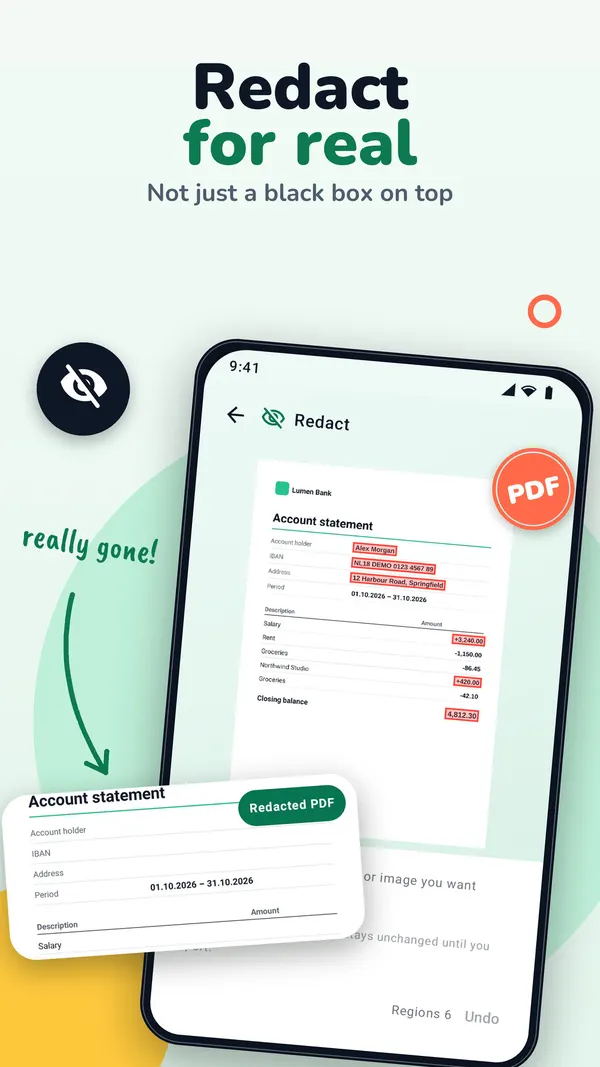
- Mark what must go. Drag a rectangle over each name, number, address or picture. Use Previous page and Next page to move through the file.
- Export the redacted PDF. Tap Export redacted PDF. DocMint builds a new file; the original stays unchanged.
- Send or save it. Android's share sheet opens. Send the PDF, or save it.
- Check the result. Open the new PDF, search for a word you covered, or copy its text into a note. The word should not be there.
What happens
What DocMint removes
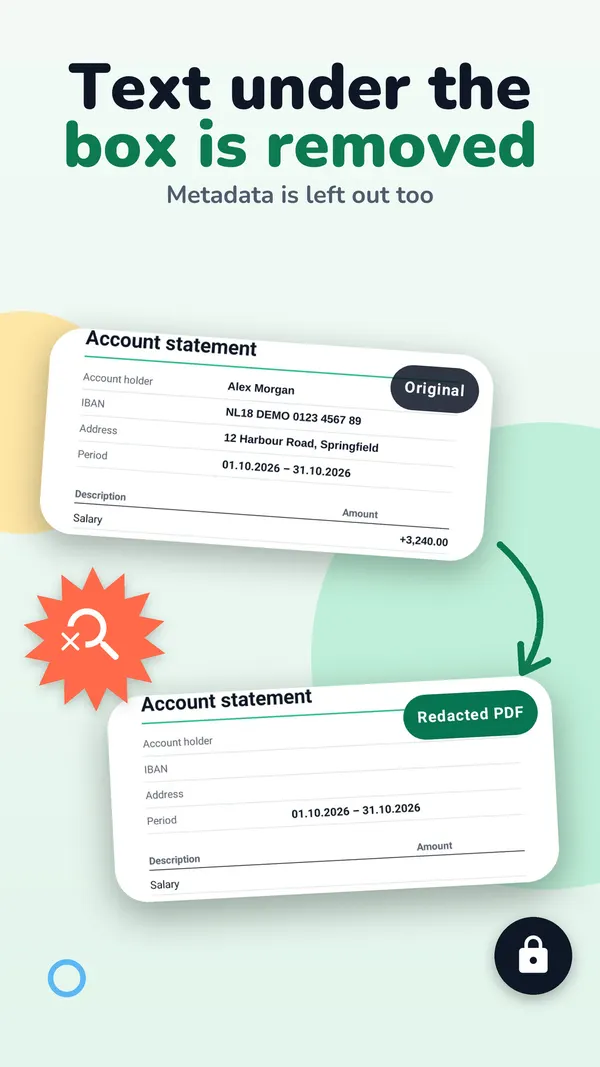
- The text under each box is removed from the file, not just covered.
- Pictures under a box are painted over in their pixels.
- The new PDF is built from the pages only, so metadata and attached files do not come along.
- Pages DocMint cannot rewrite safely are turned into a picture with the boxes painted in, and DocMint names them.
Only Export redacted PDF in the Redact tool removes what you marked there. The normal Export PDF does not.
For a scanned paper page, open the page, tap Annotate and choose Redact. The black box is burned into the picture of the page, and that page's recognized text is left out of the export. This is free.
Limits
What to watch out for
- Only what is under a box is removed. If the same name appears on another page, mark it there too. Search the document before you export.
- Cover whole words. A thin box over only the top or bottom of the letters can miss them. Make the box a little larger than the text.
- Older versions. DocMint 1.2.7 and 1.2.8 for iPhone, and Android versions before 1.1.0, could leave part of the covered text in the file when a PDF used certain common fonts. This was fixed in November 2026. If you shared a redacted PDF made with an older version, redact the original again and share the new file.
Marking areas is free. Exporting a redacted PDF is part of DocMint Pro, which is a one-time Lifetime purchase or a monthly subscription. The store shows the price before you buy. On Android, purchases go through Google Play.
There is no account. Your documents stay on your phone, and DocMint does not upload them, their text or their file names. See the DocMint privacy policy.
FAQ
Questions
Is highlighting in black in Google Drive enough?
No. Drive's own toolbar can hide annotations, which shows the marks are separate from the page. The text underneath stays in the file.
Does DocMint need an internet connection to redact?
No. Editing, redacting and exporting work offline.
Does the original PDF change?
No. DocMint saves the redacted copy as a new file.
Is redaction free in DocMint?
Marking areas is free. Exporting a redacted PDF is part of DocMint Pro, which is a one-time Lifetime purchase or a monthly subscription. The store shows the price before you buy.
Get DocMint
Scan, sign and redact PDFs on your phone
DocMint is free to download. Scanning, text recognition and signing are free; DocMint Pro adds redacted PDF export and exports without the DocMint mark. No account, and your documents stay on your phone.
All DocMint guides · Black out text in a PDF · Remove personal data from a PDF · Redact a PDF on iPhone
Sources
Sources
We link to the pages behind every statement about another app or platform. They can change after the date we checked them.
- Annotate PDFs with a stylus or freehand on Android, Google Drive Help. Checked November 14, 2026.
- Open, manage & edit PDFs in Files by Google, Files by Google Help. Checked November 14, 2026.
- Embarrassing Redaction Failures, Herbert B. Dixon Jr., The Judges' Journal, American Bar Association. Published May 1, 2019. Checked November 14, 2026.