 Bumblly
TextMint guide
Text messages as evidence: how to make a clean, dated record
Texts can matter in a custody case, a dispute with a landlord, a problem at work or an insurance claim. A good record is complete, in order, dated and easy to point to. This guide explains how to make one, and where the limits are.
We make TextMint, an app that turns conversations into dated PDFs. We are not lawyers, and nothing here is legal advice.
First
A word on the law
What a court accepts depends on the court, the country and the case. In US federal courts, for example, Rule 901 of the Federal Rules of Evidence asks the person who offers an item to show that it is what they say it is (Federal Rules of Evidence, Rule 901). Rules differ between courts and countries.
So ask your lawyer early what they need. Some want a printout. Some want the original files. Some want to see the phone itself. A tidy PDF helps people read the conversation, but it does not replace what the court or your lawyer asks for.
Good practice
What makes a record useful
- Complete. The whole conversation, or a clearly stated period. Leaving out messages in the middle invites questions.
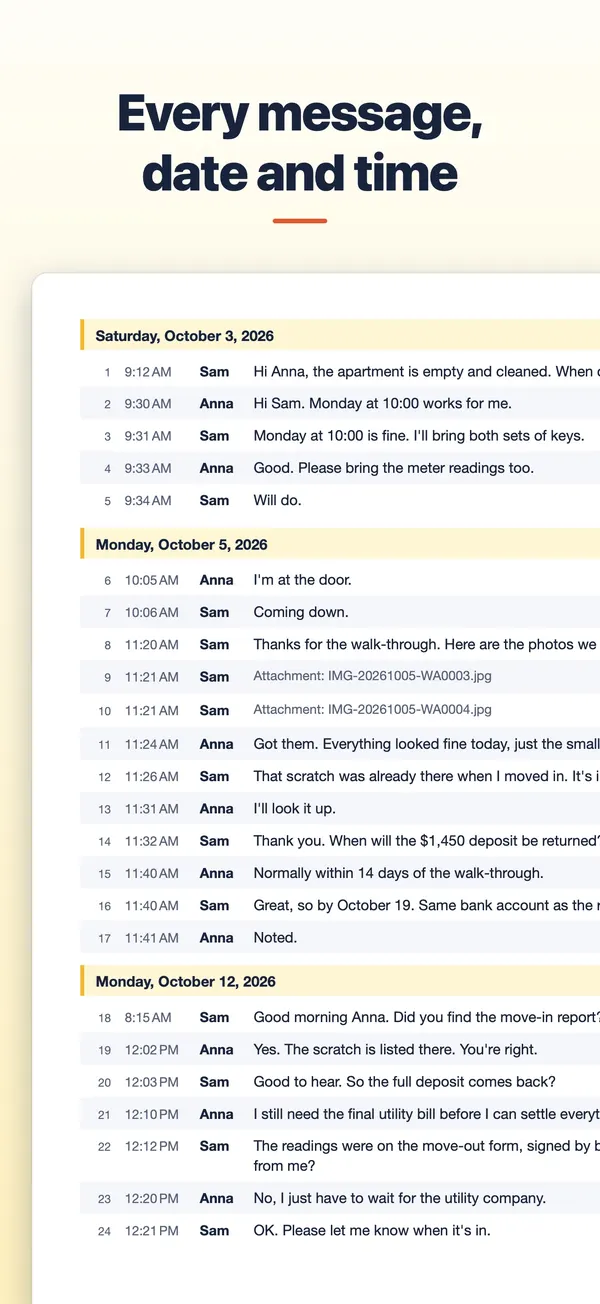
- In order, with dates. Every message with its date and time.
- Clear about who wrote what. A name on every message, not only bubbles on the left and the right.
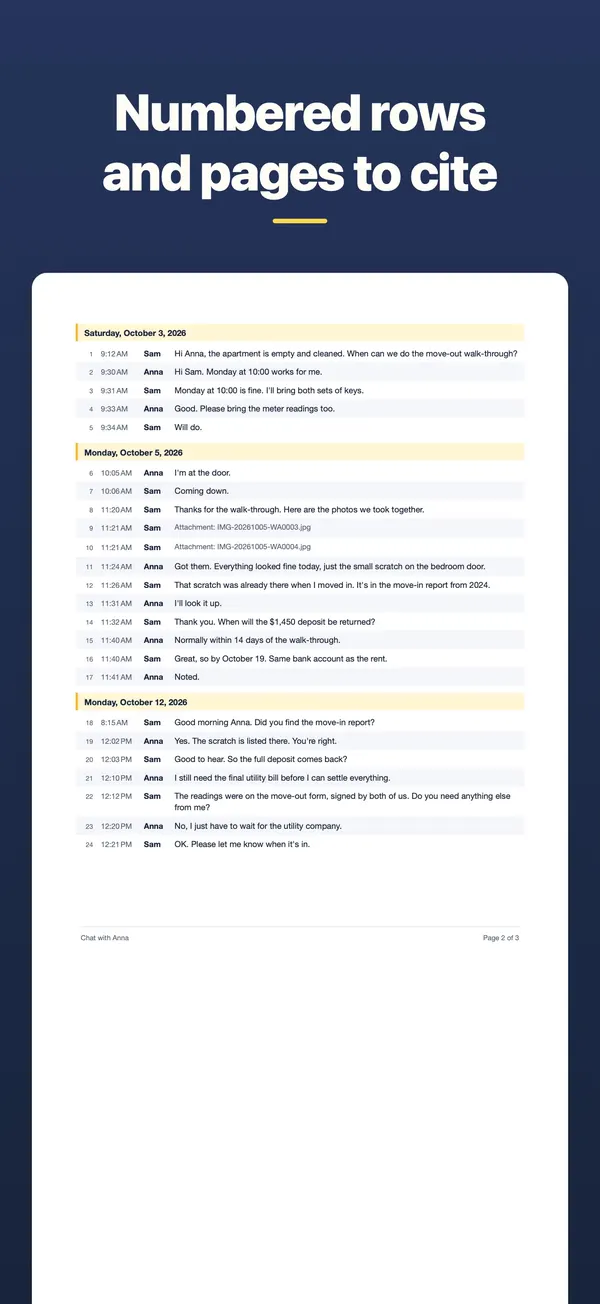
- Easy to point to. Page numbers and message numbers, so people can talk about "message 214 on page 9".
- Unchanged. No edited text, no cropped or edited screenshots.
Keep
Keep the originals
- Do not delete the conversation from your phone, and keep the phone itself.
- Keep the files the record was made from: the WhatsApp export, the screenshots or the screen recording, exactly as they are.
- Make a copy of those files somewhere safe, such as a computer.
- Write down when and how you saved them. A short note helps if someone asks later.
Step by step
Make the record with TextMint
- Pick the best source. A WhatsApp export carries the date, time and name of every message. For Messages and other apps, use overlapping screenshots or a screen recording.
- Fill in the document details. In Options, give the document a title and type the case or file number under Reference. It is printed on the cover and on every page.
- Keep the screens next to the text. For screenshots or a recording, choose the Both layout: the original screens first, then the typed rows.
- Check the names. Under Names, print a phone number as a name, or type the other person's name for screenshots. The chat itself does not change.
- Export and keep it with the originals. Tap Export PDF and keep the PDF together with the export, screenshots or recording it was made from.
What TextMint adds
Details that help a reader
- Fixed message numbers. A message has the same number in every export of the conversation, even when you export only a date range.
- A source files page. It lists every file the PDF was made from, with its size and SHA-256 fingerprint. If a file is changed later, its fingerprint changes, so anyone can check that a file is the same one.
- Honest dates. When a screenshot only says "Yesterday" or a weekday, TextMint works out the date from the moment the screenshot was taken, and the PDF says that it did.
- Visible gaps. Where two screenshots do not overlap, the PDF says "Screenshots do not connect here".
- The screens as proof of the text. Text read from pictures can contain a misread word. With the Both layout, a reader can check each typed row against the original screen.
Limits
What TextMint does not do
- It does not prove who sent a message. It shows what the export or the screens show.
- It does not certify or stamp a document, and it makes no promise that a court will accept it.
- It cannot read your messages by itself, and it cannot bring back deleted messages.
- It does not let you edit message text. You can only rename people and choose what to include.
TextMint is free to download and to try. Without a purchase, an export holds the first 3 message pages and carries a PREVIEW mark. A full export is a one-time purchase: One Export for one conversation, or TextMint Pro for every conversation. There is no subscription.
FAQ
Questions
Will a court accept the PDF?
TextMint makes a clear, dated record of a conversation. Whether a document is accepted is up to the court or office you give it to. Ask a lawyer what they need.
Can I leave out part of the conversation?
You can export a date range of whole days. Because message numbers stay the same as in the whole conversation, a reader can see that it is a part.
What is a SHA-256 fingerprint?
A short code computed from a file. If even one byte of the file changes, the code changes. The source files page lists one for each file the PDF was made from.
Should I keep my screenshots after making the PDF?
Yes. Keep the original files and the phone. The PDF is a readable copy, not a replacement.
Get TextMint
Turn a conversation into a clean, dated PDF
TextMint is free to download and to try. A full export is a one-time purchase, for one conversation or for every conversation. No subscription, no account, and your chats never leave your phone.
All TextMint guides · Texts with a landlord or employer · WhatsApp chat as PDF · Print text messages
Sources
Sources
We link to the pages behind every statement about another app or platform. They can change after the date we checked them.
- Rule 901. Authenticating or Identifying Evidence, Federal Rules of Evidence, Legal Information Institute, Cornell Law School. Checked November 14, 2026.