 Bumblly
TextMint guide
How to print text messages from an iPhone or Android phone
A lawyer, a landlord or a school asked for a printout of your texts, or you simply want a conversation on paper. Phones are not built for this. Here are the free ways, and a way to print the whole conversation as clean, numbered pages.
We make TextMint, the app at the end of this guide. The free ways come first, and for a short chat they may be all you need.
Free on iPhone
Print screenshots from Photos
Take a screenshot by pressing the side button and the volume up button together (Apple Support). To print it, open it in Photos, tap the Share button and swipe up to Print (Apple Support).
Free on Android
Screenshots, scrolling screenshots and backups
- Screenshot: on most phones, press Power and Volume down at the same time (Android Help).
- Scrolling screenshot: on Android 12 and later, tap Capture more after the screenshot to capture a longer part of a screen that scrolls (same Android Help page).
- Backup apps: SyncTech says its SMS Backup & Restore app can print conversations to PDF (SyncTech).
Printed screenshots have limits. Each page is one phone screen with small text, messages repeat where screenshots overlap, and nothing numbers the pages. If the pages get mixed up, nobody can tell the order.
Step by step
Print the whole conversation with TextMint on iPhone
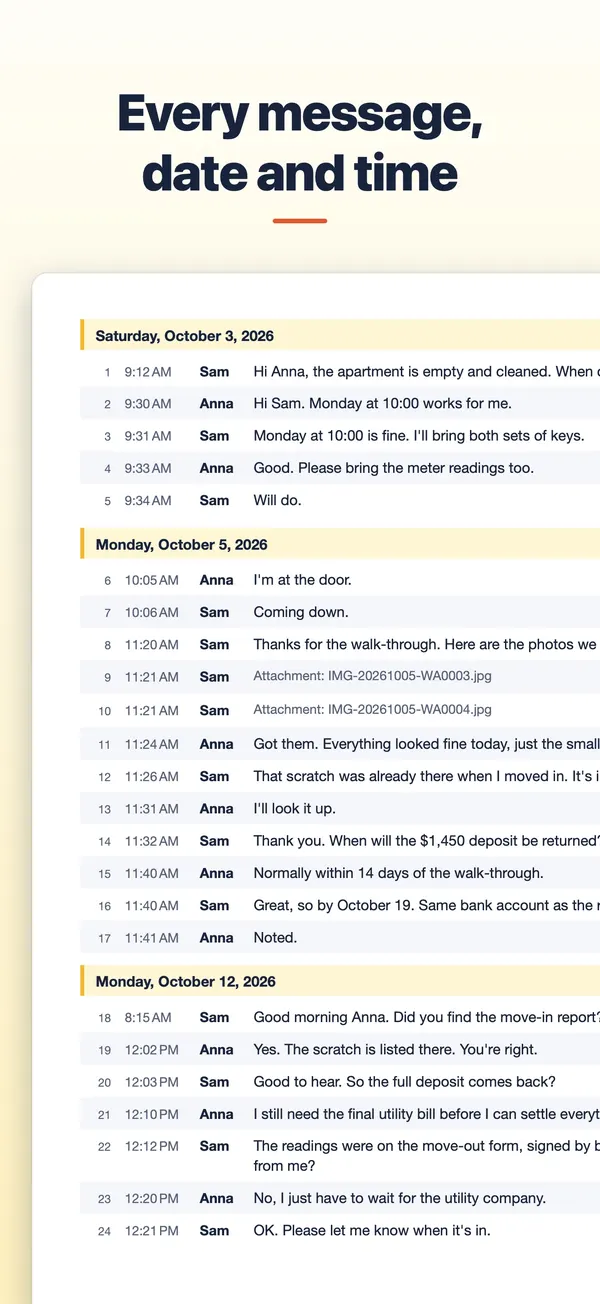
TextMint turns a conversation into a document made for paper: typed rows with date, time and sender, and page numbers on every page.
- Bring the conversation into TextMint. Tap Add a conversation and choose a WhatsApp chat export, screenshots, a screen recording, or pasted text.
- Choose the paper. Tap Options, then Paper size: US Letter or A4. TextMint starts with Letter in the US and Canada and A4 elsewhere.
- Choose what goes on paper. In Options, switch the cover page and the source files page on or off, and turn on Only part of the conversation to print a date range.
- Print. Tap More, then Print. Your iPhone's print dialog opens with every page of the document.
Android
TextMint for Android
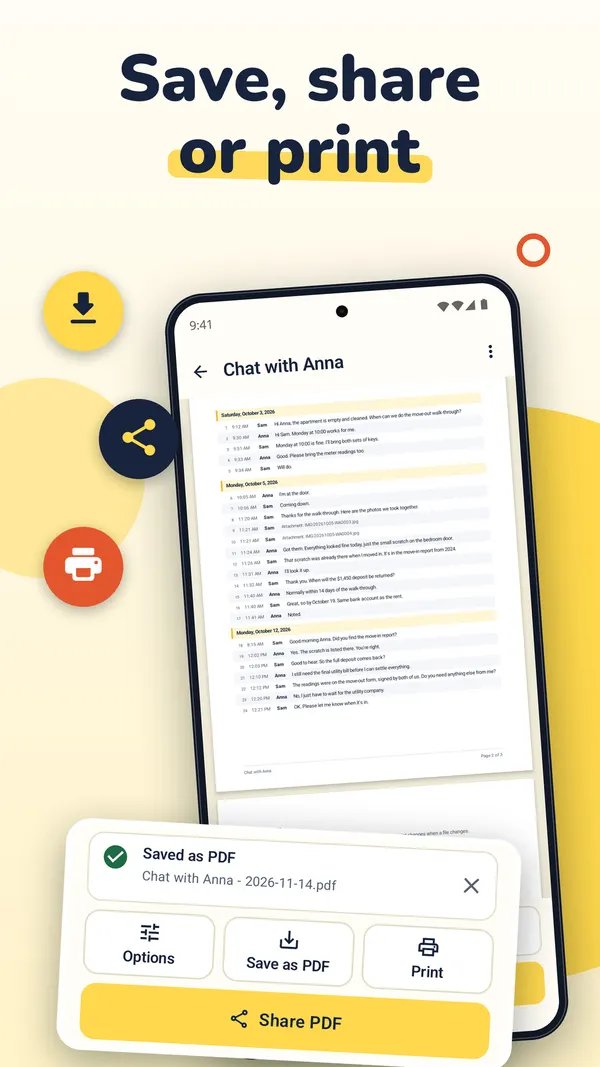
On Android, Print is a button of its own, next to Save as PDF and Share PDF. It opens Android's print dialog with the PDF.
Tips
Make the printout easy to use
- Point to one message. Every row has a number, so you can write "see message 214". The numbers stay the same each time you export the same conversation.
- Keep pages in order. Every page says "Page 3 of 12" at the bottom.
- Add a reference. Type a case or file number under Reference in Options. It is printed on the cover and at the foot of every page.
- Show seconds when the exact time matters: turn on Seconds in times.
- Use names people know. Under Names you can print a phone number as "Landlord" or "Manager". The chat itself does not change.
TextMint is free to download and to try. Without a purchase, an export holds the first 3 message pages and carries a PREVIEW mark. A full export is a one-time purchase: One Export for one conversation, or TextMint Pro for every conversation. There is no subscription.
FAQ
Questions
Can I print without buying anything?
Yes, the free preview. It holds the first 3 message pages and carries a PREVIEW mark. A full printout needs a one-time purchase.
Letter or A4?
Both. Change it in Options under Paper size. TextMint starts with Letter in the US and Canada and A4 elsewhere.
Can I print only a few days of a long chat?
Yes. Turn on Only part of the conversation in Options and pick From and To. The message numbers still match the whole conversation.
Do I need a printer at hand?
No. Save the PDF and print it later, or send it to someone who will print it.
Get TextMint
Turn a conversation into a clean, dated PDF
TextMint is free to download and to try. A full export is a one-time purchase, for one conversation or for every conversation. No subscription, no account, and your chats never leave your phone.
All TextMint guides · Export texts from iPhone to PDF · Text messages as evidence · Save texts from Android
Sources
Sources
We link to the pages behind every statement about another app or platform. They can change after the date we checked them.
- Take a screenshot on iPhone, Apple Support, iPhone User Guide. Checked November 14, 2026.
- View, share, and print photos on iPhone, Apple Support, iPhone User Guide. Checked November 14, 2026.
- Take a screenshot or record your screen on your Android device, Android Help. Checked November 14, 2026.
- Print SMS Conversation: print to PDF failing, SyncTech (support note from 2020). Checked November 14, 2026.